


Principal's Welcome
Dr Andrew Cousins Light it up and let your light shine! On behalf of all our College staff, I warmly...

Dr Andrew Cousins

Light it up and let your light shine!

On behalf of all our College staff, I warmly welcome you to our Clayfield family. I look forward to connecting with you either on campus or at one of our community events in the near future. At Clayfield College, we strive to be a beacon of light for parents seeking a true partner in the nurture and education for the whole of their child.

We have a plan for your child. It starts with knowing, valuing and understanding them as an individual with unique interests, voice and potential. Then, through customised programs that are designed to value the needs of each learner, your child becomes part of a nurturing community that is intentionally structured to maximise opportunities.

Working together, your family and Clayfield College can equip your child for a bright future with life in all its fullness.

Our holistic approach to the authentic wellbeing and personal development of your child means they will experience belonging, connection and growth without sacrificing academic rigour. The student-centred learning experience will deliver consistently strong academic outcomes.

Within the Junior School and Senior School sections of this publication, you will find information to assist you and your child with a smooth beginning to College life at Clayfield. As a new family, I encourage you to contact the school if there is anything requiring further explanation. It is important to us that you have a seamless transition.

We look forward to being part of your child’s educational journey and to celebrating their achievements. Always remember to light it up and let your light shine!

Communication
Please refer to the Junior School and Senior School sections for more information on how each sub-school...

Please refer to the Junior School and Senior School sections for more information on how each sub-school communicates with families. 

The College App

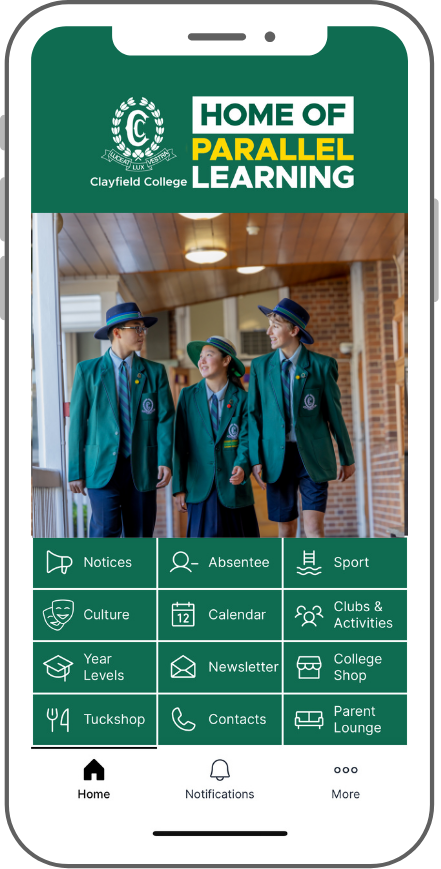
As a condition of enrolment, we request that every parent/caregiver downloads the College App (free download). The App provides information about events and activities, as well as important notices and alerts (for example, training cancellations or venue changes, wet weather plans and ETA of buses returning from co-curricular activities). It also includes access to the school calendar and key school contacts. Parents/caregivers are asked to manage notifications and subscriptions to ensure you receive relevant information based on your family preferences and student activities.  Please refer to the Resource page on the College website for further information or click here for the Clayfield College App guide.

Click here for download instructions.

Download the College App from:

The Clayfield Collective

The Clayfield Collective is a weekly bulletin, sent via email every Thursday. This communication includes brief snapshots of upcoming events in Junior and Senior, notices and date claimers. You can also access The Clayfield Collective via the Clayfield App.

Parent Lounge

Parent Lounge provides up-to-date information on College life. Such information includes your child’s timetable and teacher, policy documents, excursion details, school calendar and parent directory. Parents are also able to update their contact details and child’s medical details, view Report Cards and schedule Parent/Teacher interviews. 

Families joining our community in 2026 will be emailed their log in information, and instructions on how to access Parent Lounge one week prior to commencement. 

Please change your password once you login initially. Parent Lounge can also be accessed via the Clayfield College App and website. 

Medical Information: Action Required by New Parents

It is important we have a current record of your child’s medical status to provide adequate care and support when required. Please make sure you update your child’s medical requirements including dietary requirements through the Parent Lounge Portal. Please also check that emergency contact details are accurate and correct.

Email

Staff can be contacted via email during the school week. Email addresses are the first initial of the teacher’s name and their surname with @clayfield.qld.edu.au. If you are contacting the teachers via email, please be aware they will only check emails throughout the day as their teaching schedule permits and therefore will not be able to reply immediately. Whilst staff are more than happy to communicate with you through email, please be aware that there is a 48-hour response time. Further, the Parent Code of Conduct, outlines appropriate communication guidelines, between parents and staff members and we encourage you to review this document. If the matter is urgent, please call Main Reception on 3262 0262, where a message will be passed on and the teacher will contact you when they are available.

Quick Contacts

College Staff

Position Staff Member Contact Information
Principal Dr Andrew Cousins principal@clayfield.qld.edu.au
Deputy Principal Mrs Lakshmi Mohan lmohan@clayfield.qld.edu.au
Director of Junior School Mr Damien Marshall dmarshall@clayfield.qld.edu.au
Director of Senior School Mrs Natasha Podoliak npodoliak@clayfield.qld.edu.au
Director of Boarding Mrs Kathryn Searle boarding@clayfield.qld.edu.au
Chaplain Rev Paul Yarrow pyarrow@clayfield.qld.edu.au
Dean of Senior School Mr Adrian Walker awalker@clayfield.qld.edu.au
Dean of Junior School Mrs Miriam Bryan mbryan@clayfield.qld.edu.au
Dean of Curriculum Mrs Kim Eagle keagle@clayfield.qld.edu.au
Acting Dean of Wellbeing and Safeguarding Ms Georgia Corpe gcorpe@clayfield.qld.edu.au
Head of Pre-Prep to Year 2 Mrs Robynne Bailey rbailey@clayfield.qld.edu.au
Head of Year 3 to 6 Mrs Lauren Coote lcoote@clayfield.qld.edu.au
School Nurse Mrs Margaret Guiney healthcentre@clayfield.qld.edu.au
School Counsellor (Parental Leave Cover) Miss Jess Weller jweller@clayfield.qld.edu.au
Administrator – Academic and Curriculum Services Mrs Ianthe Campbell icampbell@clayfield.qld.edu.au
Administrator – Junior School Executive Support Officer Mrs Julee Shiby jshiby@clayfield.qld.edu.au
Executive Administrative Assistant Mrs Miranda Cavaliere mcavaliere@clayfield.qld.edu.au

General Contacts and Enquiries

Department Contact Information
Main Reception reception@clayfield.qld.edu.au
Sports and Activities sport@clayfield.qld.edu.au
Music music@clayfield.qld.edu.au
Enrolments Team enrol@clayfield.qld.edu.au
Marketing Team marketing@clayfield.qld.edu.au  
Finance Team fees@clayfield.qld.edu.au
ICT Team itsupport@clayfield.qld.edu.au
Uniform Shop  clayfieldcollege@theuniformcompany.com.au

Junior School Overview
First Day Organisation All students need to bring their new textbooks and stationery on their first...

First Day Organisation

All students need to bring their new textbooks and stationery on their first day of school. These should be clearly labelled with their name. Class teachers will provide further information to the students in relation to book subject titles and headings. Student Diaries will also be distributed to students on their first day of school.

Lesson Times

Students can be dropped at school from 7:30am when there will be a teacher on duty in the Learning Resource Centre (LRC). We kindly ask for students not to be dropped off before this time as there will be no one in the classrooms or playground to supervise them.

  • First bell: 8:25am
  • Roll call: 8:30am
  • Morning tea: 10:20am to 10:40am
  • Lunch: 12:50pm to 1:30pm
  • End of day: Pre-Prep to 2:30pm to 3:00pm
  • End of day: Prep to Year 2 to 3:00pm
  • End of day: Years 3 to 6 to 3:10pm

Daily Morning Arrival

Prep to Year 6 classrooms open from 8:25am. Pre-Prep open their doors at 8:30am.

Teachers are on duty from 8:00am and therefore you will understand the associated risks involved in leaving students before this time. If arriving before 8:25am, students are permitted to drop their bags outside classrooms, put their hats on and go to the playground area. The Learning Resource Centre (LRC) is open from 7:30am if students arrive before 8:00am. There should be no Junior students left unattended before 7:30am. A bell will ring, which signifies the beginning of the school day at 8:25am and students should line up outside their classroom to wait for their teacher. The playground equipment is not to be used before school; however, the Amphitheatre and Leopard Terrace areas are available for play.

A parent/caregiver must sign in their Pre-Preppie each day once the classrooms open at 8:30am.

It is advisable for parents to say a swift goodbye to avoid prolonging any anxious moments felt by your child. If your child has had a particularly difficult separation, we encourage you to call Main Reception on (07) 3262 0262 for an update on how they have settled.

Afternoon Pick Up Times and Collection Points

Year Level Collection Time College Entry Points
Pre-Prep 2:30pm to 3:00pm
Program finish: 3:00pm
Pre-Prep classroom
Prep to Year 2 3:05pm to 3:20pm  Circular Drive / or park and walk-in
Year 3 and siblings 3:15pm to 3:30pm
School finish: 3:10pm
Circular Drive / or park and walk-in
Year 4 and siblings 3:15pm to 3:30pm
School finish: 3:10pm
Circular Drive / or park and walk-in / Bayview Terrace if they have an older sibling
Years 5 and 6 3:15pm to 3:30pm
School finish: 3:10pm
Bayview Terrace / or park and walk-in / Circular Drive if they have a younger sibling
If you have siblings in Prep to Year 2 and Years 3 to 6, please arrive at the later time between 3:15pm to 3:30pm.

2026 Term Dates

To assist with your planning of the school year and holidays, please find below the school Term dates for 2026.

Term Commencement Date Conclusion Date
Term 1 Tuesday 27 January (Boarders)
Wednesday 28 January (All students)
Wednesday 1 April
Term 2 Monday 20 April (Boarders)
Tuesday 21 April (All students)
Thursday 18 June
Term 3 Monday 13 July (Boarders)
Tuesday 14 July (All students)
Thursday 17 September
Term 4 Monday 5 October (Boarders) 
Tuesday 6 October (All students)
Wednesday 2 December

We urge parents to avoid taking children out of school during Term to minimise the disruption and progress of students’ learning. However, if it is necessary, parents are reminded of the legal requirements to submit a request for leave to our Director of Junior School via e-mail. Thank you for your assistance in this matter.

2026 Calendar Events

The 2026 School Calendar can be found on the College App and via Parent Lounge. More information on how to access the College App is available here.

Junior School Staffing

Please find the 2026 Junior School Staff List by clicking the button below

Student/Parent/Teacher Feedback/Feedforward

We are always seeking ways to provide the best possible feedback on students’ academic and pastoral progress. We aim to offer families many opportunities throughout the year to engage with their child’s development through Student/Parent/Teacher conferences, Gallery Walks, digital folio feedback and feedforward, and Semester 1 and 2 report cards.

Sun Safety

We have a ‘No Hat No Play’ policy in the Junior School. Please make sure you provide a named school hat each day for your child. In the past, students have relied upon spare hats to be used which can be an unhygienic practice due to the spread of hair lice. Each classroom has sunscreen for students to apply before morning tea and lunch. 

Uniform Guidelines 

Parents are asked to assist the College in ensuring their children are correctly dressed each day.

Please refer to our Uniform Policy below.

Mobile Phones and Watches

If bringing a mobile phone to school, students must sign these in at Junior School Reception before 8:30am. Mobile phones may then be collected at the end of the school day. Please note, Junior students are not permitted to wear smartwatches.

Crunch and Sip

Each day the students will be given an opportunity to enjoy a morning snack during the first two lessons. This time will provide students with a chance to ‘refuel’ on fruit or vegetables and ‘rehydrate’ with water. As many students enjoy early breakfasts or participate in before school activities, this important snack time will ease any hunger pains and improve concentration before the morning tea break. Please ensure you pack a healthy snack for your child to enjoy for ‘Crunch and Sip’ in their lunchbox each day. This snack is in addition to morning tea and lunch and cannot be provided by the Tuckshop.

Tuckshop

Junior students (Prep to Year 6) have the option to enjoy healthy food from the Tuckshop at morning tea and lunchtime. The FlexiSchools online ordering system is available for all students. If you do not have a previous account, please log on to the FlexiSchools website where you will find all the details to order from the Clayfield College Tuckshop. You will notice there is a cut-off period at 8:30am every day; therefore, morning tea and lunch orders need to be placed before this time daily. Tuckshop staff will not be taking orders with cash and we therefore respectfully ask that you do not order directly from the Tuckshop or send money with your child. Students in Years 2 to 6 may purchase extra snacks with their own money or student card after staff dismiss them from the eating area. The Flexischools online ordering system is the preferred method for Junior students using the Tuckshop. 

Fundraising Friday and Awareness Days Pre-Prep to Year 12

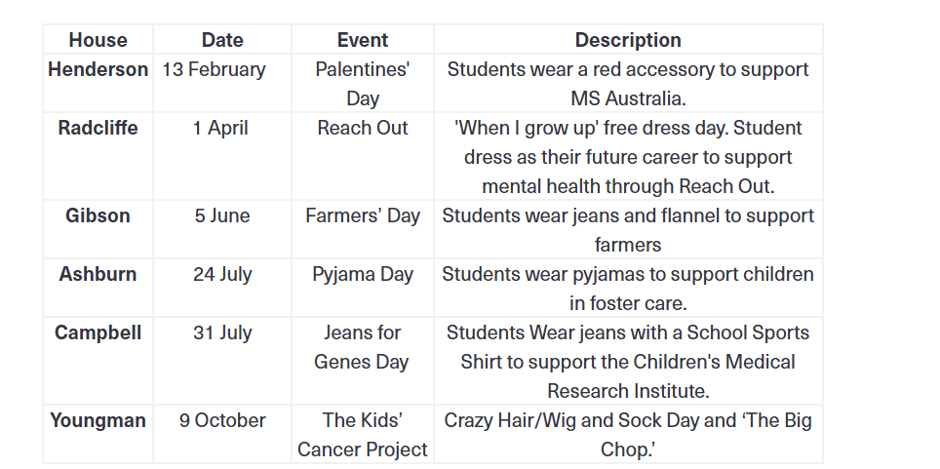
Specific fundraising days will fall on a Friday and be linked to a House. These will be confirmed in January 2026 and communicated in The Clayfield Collective and the Clayfield App. 

Awareness Days are also celebrated throughout the year with various activities; however, there will be no change to uniform, only ribbons or badges worn on the school uniform. 

  • Clean-Up Clayfield Day           
  • Earth Hour Awareness          
  • NAIDOC Awareness               
  • RUOK Awareness                     
  • Pink Ribbon Awareness         

Clubs Program Prep to Year 6

Clubs are optional and the offerings change each Term. These opportunities will be communicated in The Clayfield Collective. 

After-school Activities (External)

For Pre-Prep and Prep students, coaches will collect the students from their classrooms and escort them to various activities. Please let your child’s teacher know of any after school activities you have booked for your child.

Class Coordinator and Friends of Junior Group

Clayfield College is supported by our wonderful Parents and Friends Association (P&F) which is made up of the following interest groups: the Friends of Junior Group, the Friends of Sports Group, the Friends of Music Group and the Friends of Boarders Group. Each group has their specific focus and role, and come together to support the College by organising social events and fundraising. All parents and carers in the Junior School are welcome to attend the P&F meetings, which are usually held once a Term.

Communication

Please note the following forms of communication used in the Junior School.

Formal

  • The College App
  • Student Diary
  • The Clayfield Collective
  • Parent Lounge
  • Email
  • Class Dojo

Informal

  • Class WhatsApp

The College App

As a condition of enrolment, we request that every parent/caregiver downloads the College App (free download). The App provides information about events and activities, as well as important notices and alerts (for example, training cancellations or venue changes, wet weather plans and ETA of buses returning from co-curricular activities). It also includes access to the school calendar and key school contacts. Parents/caregivers are asked to manage notifications and subscriptions to ensure you receive relevant information based on your family preferences and student activities.  Please refer to the Resource page on the College website for further information or click below for the Clayfield College App guide. 

Click here for download instructions.

Download the College App from:

Student Diary

Every student from Prep to Year 6 will be issued a College Diary on their first day. As well as a student organisational tool, the College Diary is a daily form of communication between families and teachers in the Junior School. The diary is to be brought to and from school every day where teachers will stamp/sign each day of the week. Every year level will have different expectations for the use of the Diary according to their age. Please use this communication tool for any general messages you would like the teacher to know. Personal and confidential matters can be addressed via email directly to your child’s teacher.

The Clayfield Collective

The Clayfield Collective is a weekly bulletin, sent via email every Thursday. This communication includes brief snapshots of upcoming events in Junior and Senior, notices and date claimers for upcoming events. You can also access The Clayfield Collective via the Clayfield App. 

Parent Lounge

Parent Lounge provides up-to-date information on College life. Such information includes your child’s timetable and teacher, policy documents, excursion details, school calendar and parent directory. Parents are also able to update their contact details and child’s medical details, view Report Cards and schedule Parent/Teacher interviews.

Families joining our community in 2026 will be emailed their log in information, and instructions on how to access Parent Lounge one week prior to commencement. 

Please change your password once you login initially. Parent Lounge can also be accessed via the Clayfield College App and website. 

Email

Staff can be contacted via email during the school week. Please note the best way to contact your class teacher is via the Student Diary, as they will check these every morning. If you are contacting the teacher via email, please be aware they may not be checking emails throughout the day and therefore will not be able to reply immediately. If the matter is urgent, please call Main Reception on 3262 0262, where a message will be passed on and the teacher will contact you. 

Class Dojo

This platform is used by our Junior teachers for the sharing of class-specific information and pictures, directly with their class parents. It is important to note that Class Dojo is not used for Junior or Clayfield College formal notices. 

Class WhatsApp

The Friends of Junior Group, through the Class Coordinators, facilitate a WhatsApp Group per year level for any parent who wishes to join. This informal platform shares social events and practical information. This is a parent-based community platform that is run independently from the College, however, is monitored by the College.

Learning Resource Centre

The Learning Resource Centre (LRC) is utilised by students throughout the school week for book borrowing and quiet play before school and at lunchtime. The LRC is open from 7:30am Monday to Friday. For students in Years 1 to 6, Homework Club is offered from Monday to Thursday; 3:15pm to 5:00pm. Students must be booked in for Homework Club via email to studentservices@clayfield.qld.edu.au. It is preferred that parents sign their child out of Homework Club from the Upper LRC. Alternatively, a text message or phone call to your child when you have arrived at the College is acceptable, if communicated to the teacher on duty.

Who Should I Ask?

In most cases, your child’s teacher should be the first point of contact for questions of an academic or pastoral nature. If the answer cannot be found here, a member of our Junior Leadership Team would be the next person you should discuss concerns with. Please be aware, we are available and committed to discussing any matter; however, in most cases, the Junior Leadership Team would obtain information pertaining to your child from the class teacher in the first instance. Therefore, following the above guidelines may produce a more efficient outcome for you.

General information should be directed to Main Reception, which can be found at the entrance of the College.

Useful Contact Details

Office Person(s) Email
Main Reception Mrs Alice David reception@clayfield.qld.edu.au
Director of Junior School Mr Damien Marshall dmarshall@clayfield.qld.edu.au
Dean of Junior School Mrs Miriam Bryan mbryan@clayfield.qld.edu.au
Head of Pre-Prep to Year 2 Mrs Robynne Bailey rbailey@clayfield.qld.edu.au
Head of Year 3 to 6 Mrs Lauren Coote lcoote@clayfield.qld.edu.au
Sport and Activities
(Andrews Cup and Britton Shield)
Miss Amy Lewin sport@clayfield.qld.edu.au
Head of Performance Music Mrs Karen Gordon music@clayfield.qld.edu.au

Junior School Staffing

View the 2026 Junior School Staff List by clicking the button below.

The Uniform Shop
The Uniform Company is the proud uniform partner to Clayfield College, providing families with all their...

The Uniform Company is the proud uniform partner to Clayfield College, providing families with all their uniform needs.

The Uniform Company is a Brisbane based uniform manufacturing company with over 50 years’ experience in supplying quality garments to Australian Schools.

In Person

The Uniform Shop is located off Bayview Terrace entry via Gate 6 (under the Assembly Hall), and carries the full range of Clayfield College uniforms for sizing and purchase. The Uniform Shop is cashless, payment can be made by EFTPOS, Visa & Mastercard. New students are recommended to book in a uniform fitting appointment. Appointments take approximately 45 minutes. 

Online Ordering

The Uniform Shop is pleased to offer the convenience of online purchasing through an online uniform portal. All uniform items (except special orders) are available for purchase through the portal; with payment to be made via credit card or PayPal. 

All orders placed through the portal can be collected from The Uniform Shop the next trading day after the order is placed; collection is dependent on the day as the shop only trades Tuesday, Wednesday, Thursday, and Friday. 

All orders will need to be processed and then available for collection by approximately 9:00am on the next opening day unless any unforeseen circumstances arise. All orders must be collected from The Uniform Shop.

You can find out more information, including our Uniform Policy and the Uniform Shop’s opening hours here.

Resources and Stationery
Campion Education is the College’s preferred supplier for textbooks and stationery. Please refer to your...

Campion Education is the College’s preferred supplier for textbooks and stationery. Please refer to your Pre-Commencement Email (sent from the Enrolments Team) for further information.

Protopic for Eczema in Australia – Your Complete Guide to Getting It Right

Buy Protopic Online: The Real Story Behind This Eczema Treatment. Visit Our Pharmacy ↓


Protopic (tacrolimus ointment) in Australia: A Doctor’s Review for Grown-Up Skin

By a dermatology-focused GP for Australians over 30

Attention: When Your Skin Refuses to Grow Up

You are over 30. You thought eczema, dermatitis, or that maddening itch would be a childhood memory. Instead, you still hide red, raw patches under long sleeves in a Queensland summer. You wake at 2 a.m. scratching until the sheets spot. You have tried hydrocortisone, moisturisers, elimination diets, and expensive creams from the chemist. The flare settles for a week, then roars back. Sound familiar?

Many adults have been stuck in this cycle for years. They fear steroid creams because a well-meaning friend said steroids “thin the skin.” They hesitate on the newer biologic injections because needles, blood tests, and out-of-pocket costs feel overwhelming. If that is you, this review is written for you.

There is a middle path. It is called Protopic — a non-steroid prescription ointment that has quietly changed how Australian dermatologists manage stubborn eczema, facial dermatitis, and even intensely itchy nodules. In this article, I will explain how Protopic works, how it compares to hydrocortisone and biologics, how to use it correctly with moisturisers, and the honest truth about its risks. By the end, you may want to ask your doctor for a script today.

Interest: What Exactly Is Protopic?

Protopic is the brand name for tacrolimus ointment. It belongs to a class called topical calcineurin inhibitors (TCIs). Unlike steroid creams, tacrolimus works by suppressing specific immune signals in the skin — mainly T-cells and mast cells — that drive eczema inflammation, redness, and itch. It calms the skin from the inside out without damaging collagen or thinning the epidermis.

Protopic ointment formulation details:

  • Contains tacrolimus monohydrate in a greasy, occlusive ointment base.
  • Inactive ingredients include white soft paraffin, liquid paraffin, propylene carbonate, white beeswax, and hard paraffin.
  • No corticosteroids, no antibiotics, no fragrance, no preservatives.
  • Available in two strengths in Australia: 0.03% and 0.1%.
  • The ointment vehicle is ideal for dry, cracked, lichenified skin because it locks in moisture and enhances drug penetration.

Because it is not a steroid, Protopic can be used safely on thin, delicate areas — eyelids, around the mouth, neck folds, and groin — where long-term steroid use is risky. It does not cause skin atrophy (thinning), stretch marks, or perioral dermatitis. That is a game-changer for adults who have been told there is nothing left between weak hydrocortisone and heavy systemic drugs.

Desire: Why Protopic Wins for Many Australian Adults

Protopic vs Hydrocortisone: Not Even Close for Stubborn Eczema

Hydrocortisone is a mild corticosteroid. It is cheap, available over the counter, and fine for mild flares. But if you are over 30 and still reading this, chances are hydrocortisone is not enough — or you have been using it for far too long on the face.

Feature Protopic (tacrolimus) Hydrocortisone 1%
Mechanism Calcineurin inhibitor — blocks immune inflammation Mild corticosteroid — suppresses inflammation broadly
Risk of skin thinning None even with long-term use Low short-term, but increases with months on face/neck
Safe for eyelids/face Yes — preferred choice Short courses only; not ideal long-term
Strength for moderate eczema 0.1% roughly equivalent to mid-potency steroid Mild; often too weak for chronic plaques
Maintenance use Can be used twice weekly to prevent flares Not recommended for continuous use
Initial sensation Common burning/stinging first 3–5 days Generally comfortable
PBS availability Yes, for chronic severe atopic dermatitis with restrictions OTC, not PBS for most strengths

If your eczema is only slightly pink and settles with a day of hydrocortisone, stick with hydrocortisone. But if you are using hydrocortisone daily on your eyelids, or if the flare keeps coming back, Protopic is the safer long-term partner.

Protopic and Biologic Therapies: A Sensible Comparison

Biologic therapies such as dupilumab (Dupixent) have transformed severe atopic dermatitis. They are injections, usually fortnightly, and work systemically. In Australia, they are PBS-subsidised only for severe cases that have failed optimal topical therapy. They can be life-changing — but they are not for everyone.

Feature Protopic (topical) Biologic therapy (e.g. dupilumab)
Route Ointment applied to skin Subcutaneous injection
Needles / blood tests No Yes — regular monitoring often required
PBS access Chronic severe atopic dermatitis; specialist initiation Severe disease after failure of topical therapy; specialist
Cost to patient PBS copay or private script, generally affordable PBS copay if eligible; otherwise very expensive
Best for Localised facial/neck eczema, maintenance, steroid-sparing Widespread severe eczema, asthma, or poor topical response
Convenience Apply twice daily, no travel to infusion centre Inject at home fortnightly, but initial specialist visits

In my practice, many patients use both: a biologic for systemic control, and Protopic for stubborn facial or hand flares. But if your disease is localised — even if severe — Protopic often avoids needles altogether.

Protopic and Moisturisers: The Correct Order of Application

This is the number one question I hear: “I use moisturiser and Protopic — which goes first?” The answer matters because getting it wrong can dilute the medicine or increase burning.

My recommended order:

  1. Bathe or shower, then pat skin dry gently with a towel.
  2. Apply a thin layer of Protopic to the affected areas only.
  3. Wash your hands after application unless your hands are the treatment area.
  4. Wait 10–15 minutes for the ointment to absorb and form a protective film.
  5. Then apply your regular moisturiser or emollient to the whole body, including treated areas.

Why this order? Protopic is lipid-based and occlusive. If you apply moisturiser first, the watery layer can act as a barrier and reduce tacrolimus penetration. Applying Protopic first allows it to bind to immune cells in the skin, then the moisturiser locks in hydration over the top. If your skin is very sensitive and you prefer moisturiser first, wait at least 30 minutes after moisturising before applying Protopic. The key is never to mix them in your palm or apply them simultaneously.

Protopic and Prurigo Nodularis: Relief for the Itch You Thought Would Never Stop

Prurigo nodularis is a cruel condition — hard, intensely itchy nodules, often on the arms, legs, and back. Scratching makes the nodules thicker, and the thicker they get, the more they itch. Many adults over 30 have suffered for years with no real answer. Steroid injections help but cannot be used forever.

Protopic is increasingly used off-label by Australian dermatologists for prurigo nodularis. It works by reducing the neurogenic inflammation and T-cell activity in the nodules, which dampens the itch-scratch cycle. Because it is non-steroid, it can be applied for longer periods on thick, lichenified nodules without the atrophy that frequent steroid use would cause.

The ointment formulation is particularly useful here: the greasy base softens the hard nodule and improves penetration. Patients often need to apply it twice daily for 4–8 weeks to see flattening and reduced itch. It is not a miracle overnight, but it is a steroid-sparing option for a very difficult condition.

Protopic and Sweating: How to Avoid the Burn

One of the most common side effects of Protopic is a warmth, burning, or stinging sensation during the first 3–5 days of use. This usually settles as the skin adjusts. However, heat and sweating can make this sensation worse.

Practical advice for Australian conditions:

  • Apply Protopic at night, after your evening shower, when the body is cooler.
  • Avoid saunas, hot yoga, vigorous exercise, and direct sun exposure for 2–3 hours after application.
  • In summer, keep treated areas cool with fans or air conditioning.
  • If sweating is unavoidable, gently blot the skin; do not rub.
  • Do not cover the treated area with tight clothing or occlusive dressings unless your doctor advises.

Sweating itself does not stop Protopic from working, but it increases moisture and heat under the ointment, which can intensify stinging. If burning persists beyond a week, tell your doctor — you may need the lower 0.03% strength or a different schedule.

Protopic PBS Restrictions for Children (and What It Means for You as a Parent)

Many Australians over 30 are parents. If your child has severe eczema, you need to know how PBS access works for Protopic.

  • The 0.03% ointment is PBS listed for children aged 2 years and older.
  • The 0.1% ointment is PBS listed for adults and adolescents aged 16 years and older.
  • PBS indication: chronic severe atopic dermatitis that has not responded adequately to other topical treatments such as corticosteroids, or where those treatments are contraindicated.
  • Treatment must be initiated by, or in consultation with, a dermatologist or paediatrician. A GP may continue scripts once the initial authority is in place.
  • This restriction exists to ensure Protopic is reserved for those who really need it, and to protect children from unnecessary medication.

For adults, the same PBS listing applies: chronic severe atopic dermatitis, specialist-initiated. If you fit this description, you are likely eligible. Private scripts are also available if you do not meet PBS criteria, but the cost is higher.

The Lymphoma Warning: What You Need to Know Without Fear

If you Google Protopic, you will quickly see a boxed warning about a possible increased risk of lymphoma and skin cancers. It sounds frightening. Let me give you the honest, balanced picture.

The warning originated from early animal studies and a small number of post-marketing case reports. Since then, large long-term registry studies involving thousands of patients have not found a clear causal link between topical tacrolimus and lymphoma in humans. The absolute risk, if any, appears to be extremely low.

That said, this is a prescription medicine, not a cosmetic. You should:

  • Use the lowest effective strength for the shortest time needed to control flares.
  • Use maintenance therapy (twice weekly) only on areas prone to frequent flares.
  • Avoid Protopic if you are immunocompromised or have a history of lymphoma.
  • Use sun protection on treated skin, as UV exposure is a known skin cancer risk.
  • Attend regular skin checks with your GP or dermatologist.

For most adults with chronic eczema, the quality-of-life benefits of Protopic far outweigh the theoretical risks. The key is informed, responsible use.

Action: Take Back Control of Your Skin Today

You have spent enough years hiding your hands, avoiding mirrors, and waking up exhausted from the itch. Protopic is not a miracle cream, but it is one of the most effective non-steroid tools we have for grown-up eczema, facial dermatitis, and prurigo nodularis. It can be used long-term without skin thinning, it is safe on delicate areas, and it fills the gap between hydrocortisone and biologic injections.

Your next steps:

  1. Book an appointment with your GP or dermatologist.
  2. Ask: “Is Protopic suitable for my eczema/dermatitis/prurigo nodularis?”
  3. Discuss PBS eligibility — if you have chronic severe atopic dermatitis, you may be covered.
  4. Get a script for the correct strength (0.03% for children, 0.1% for adults/adolescents 16+).
  5. Apply it correctly: thin layer to affected areas, wait 15 minutes, then moisturise.
  6. Expect a few days of warmth or stinging — that means it is working — then enjoy calmer skin.

Don’t let another flare dictate your day. Don’t settle for hydrocortisone that is not strong enough or fear steroids so much that you suffer in silence. Protopic is here, it is PBS-listed for those who need it, and it could be the turning point your skin has been waiting for.

Disclaimer: This article is for educational purposes only and does not replace individual medical advice. Always consult a qualified healthcare professional before starting or changing treatment.

viagra
protopic
androgel

Senior School Overview
First Day Organisation Students will be greeted by their Head of Year and Buddy at Main Reception on...

First Day Organisation

Students will be greeted by their Head of Year and Buddy at Main Reception on their first day. Students are to bring their new textbooks, stationery and device. Student Diaries will also be distributed to students on their first day of school. 

Key Times

  • First bell: 8:25am 
  • Roll call: 8:30am
  • Morning Tea: 10:20am to 10:40am 
  • Lunch: 12:50pm to 1:30pm 
  • End of day: 3:10pm 

Pastoral Care Class 

Each morning students attend a 10 minute Pastoral Care (PC) class 8:30am to 8:40am. Roll Call will be taken, and Daily Notices addressed at this time. There will be three PC groups per House to provide better opportunities for interaction and engagement in activities. 

Senior School Staffing 

We are delighted to have the following staff, who bring a wealth of experience and knowledge to our Senior School.

Senior Leadership and Administration

Staff Position
Dr Andrew Cousins Principal
Mrs Lakshmi Mohan Deputy Principal
Mrs Natasha Podoliak Director of Senior School
Rev Paul Yarrow Chaplain
Mrs Kathryn Searle Director of Boarding
Mrs Jenny Brumley Executive Assistant to the Principal
Mr Adrian Walker Dean of Senior School
Ms Georgia Corpe Acting Dean of Wellbeing and Safeguarding
Mrs Kim Eagle Dean of Curriculum
Mrs Ianthe Campbell Administrator – Academic & Curriculum Services
Mrs Miranda Cavaliere Executive Administrative Assistant
Mrs Alice David Main Reception

Heads of Year

Staff Position
Mrs Sam Lennon Head of Year 7
Miss Morgan Andrews Head of Year 8
Miss Amy Hayes Head of Year 9
Ms Mariella Gibson Head of Years 10 and 11
Dr Steve Griffiths Acting Head of Year 12

Heads of Department

Staff Position and Department
To be announced Head of STEM
Mr Jacques Stemmet Head of eLearning
Mrs Angela Lockyer Head of Creative Arts and Languages
Mrs Chantal Carter Head of Business, Entrepreneurship and Performance
Ms Cerene Hughes Head of Sport and Activities 
Ms Kathryn Dore Head of English and Humanities
Mrs Karen Gordon Head of Performance Music
Ms Belinda Pilgrim Head of Inclusive Learning

House Leaders

Staff House
Mrs Karen Gordon Ashburn
Mrs Kat Ash Campbell
Mrs Rebecca Geevarghese Gibson
Mr Tim Opstelten Henderson
Mr Travis McIntosh Radcliffe 
Mrs Chez Patterson Youngman

2026 Calendar Events

The 2026 School Calendar can be found on the College App and via Parent Lounge. More information on how to access the College App is available here and Parent Lounge here.

2026 Term Dates

To assist with your planning of the school year and holidays, please find below the school Term dates for 2026.

Term Commencement Date Conclusion Date
Term 1 Tuesday 27 January (Boarders)
Wednesday 28 January (All students)
Wednesday 1 April
Term 2 Monday 20 April (Boarders)
Tuesday 21 April (All students)
Thursday 18 June
Term 3 Monday 13 July (Boarders)
Tuesday 14 July (All students)
Thursday 17 September
Term 4 Monday 5 October (Boarders) 
Tuesday 6 October (All students)
Wednesday 2 December

We urge parents to avoid taking children out of school during Term to minimise the disruption and progress of students’ learning. However, if it is necessary, parents are reminded of the legal requirements to submit a request for leave to our Deputy Principal via email. Thank you for your assistance in this matter.

Communication

Please note the following forms of communication used in the Senior School:

  • The College App
  • The Clayfield Collective
  • Parent Lounge Portal
  • Email/Phone
  • The College App

As a condition of enrolment, we request that every parent/caregiver downloads the College App (free download). The App provides information about events and activities, as well as important notices and alerts (for example, training cancellations or venue changes, wet weather plans and ETA of buses returning from co-curricular activities). It also includes access to the school calendar and key school contacts. Parents/caregivers are asked to manage notifications and subscriptions to ensure you receive relevant information based on your family preferences and student activities.  Please refer to the Resource page on the College website for further information or click below for the Clayfield College App guide. 

Click here for download instructions.

Download the College App from:

The Clayfield Collective

The Clayfield Collective is a weekly bulletin, sent via email every Thursday. This communication includes brief snapshots of upcoming events in Junior and Senior, notices and date claimers for upcoming events. You can also access The Clayfield Collective via the Clayfield App.

Parent Lounge

Parent Lounge provides up-to-date information on College life. Such information includes your child’s timetable and teacher, policy documents, excursion details, school calendar and parent directory. Parents are also able to update their contact details and child’s medical details, view Report Cards and schedule Parent/Teacher interviews.

Families joining our community in 2026 will be emailed their log in information, and instructions on how to access Parent Lounge one week prior to commencement. 

Please change your password once you login initially. Parent Lounge can be accessed via the Clayfield College App and website.

Behavioural Expectations and Policy Documents

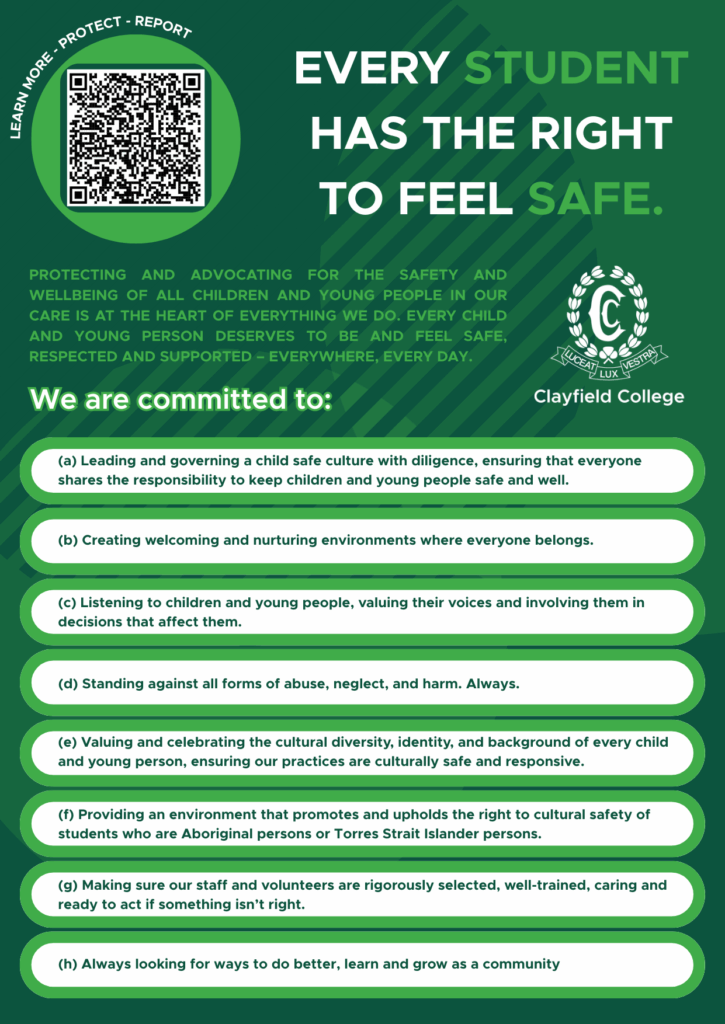
Every student has the right to a safe, supportive, and nurturing environment. Clayfield College is committed to a culture of connection and care. Such a culture is the result of clearly articulated expectations combined with high levels of accountability. It is expected that students will behave in accordance with the PMSA’s commitment to achieving fair, collaborative, inclusive and respectful working and learning environments, and with the College values of integrity, individuality, excellence, care, faith, diversity and resilience. Behaviour of a high standard requires self-discipline, self-respect and respect for the rights and property of others. It is expected that all members of the community strive for excellence in actions, speech and appearance. Ultimately, the promotion of positive behaviours is a shared responsibility, with all stakeholders having a role to play. 

Mobile Phone Policy

Students in Years 7 to 9 are to hand in their phone to Reception when they arrive at school and can collect them after school. Students in Years 10 to 12 are required to have them turned off and in their lockers and they are not to be used throughout the school day. If students are caught with their phones, they will be confiscated and can collect them from the Deputy Principal’s office at the end of the day. If it is a second offence, a meeting will be organised with parents where they will collect the phone at this time.

We will communicate with you through email notification if your child receives an Infringement for contravening school policies. You will also be notified when students receive Merit points throughout the year. The Restorative Behaviour Framework can be found in every classroom and attached here for your reference.

Tuckshop

Students have the option to enjoy healthy food from the Tuckshop at breakfast, morning tea and lunchtime. The FlexiSchools online ordering system is available for all students. If you do not have a previous account, please log on to the FlexiSchools website where you will find all the details to order from the Clayfield College Tuckshop. You will notice there is a cut-off period at 8:30am every day; therefore, morning tea and lunch orders need to be placed before this time daily.

Learning Resource Centre

The Learning Resource Centre (LRC) is open from 7:30am Monday to Friday, and closes at 5:00pm Monday to Thursday, and 3:15pm on Fridays.

Fundraising Friday and Awareness Days Pre-Prep to Year 12

Specific fundraising days will fall on a Friday and be linked to a House.

Who Should I Ask? 

In most cases, your child’s Head of Year should be the first point of contact for any general questions of an academic or pastoral nature. Please be aware, Heads of Department and Heads of Year are available and committed to discussing any academic matter; however, in most cases, they would obtain information pertaining to your child directly from the class teacher in the first instance. Therefore, contacting your child’s teacher is always the most effective first course of action. 

General information should be directed to Main Reception, which can be found at the entrance of the College. 

Useful Contact Details 

Office Person(s) Email
Main Reception Mrs Alice David reception@clayfield.qld.edu.au 
Deputy Principal Mrs Lakshmi Mohan  lmohan@clayfield.qld.edu.au  
Director of Senior School Mrs Natasha Podoliak  npodoliak@clayfield.qld.edu.au  
Director of Boarding  Mrs Kathryn Searle  ksearle@clayfield.qld.edu.au  
Chaplain  Rev Paul Yarrow  pyarrow@clayfield.qld.edu.au  
Dean of Senior School Mr Adrian Walker awalker@clayfield.qld.edu.au
Dean of Curriculum Mrs Kim Eagle keagle@clayfield.qld.edu.au
Acting Dean of Wellbeing and Safeguarding Ms Georgia Corpe gcorpe@clayfield.qld.edu.au

Policies and Procedures
All parents and caregivers are encouraged to familiarise themselves with the College’s Policies...

All parents and caregivers are encouraged to familiarise themselves with the College’s Policies and Procedures, all of which are available on our College’s website at the link below.  In particular, we draw your attention to the Parent Code of Conduct. 

Policies | Clayfield College

Wellbeing and Safeguarding – Statement of Commitment